✅ Supported on Samsung, Vivo, LG, Huawei, Honor, OPPO, realme, OnePlus, etc. 🎉


| Name | zFont 3 - Emoji & Font Changer |
|---|---|
| Publisher | Khun Htetz Naing |
| Genre | Tools |
| Version | 3.8.6 |
| Update | November 12, 2025 |
| Get it On | Play Store |
| Report | Report Apps |
Preview




Explore this article
Your Guide to zFont 3: The Ultimate Font & Emoji ChangerWhat is zFont 3?How to Change Fonts with zFont 3: A Step-by-Step GuideStep 1: Download and Install zFont 3Step 2: Browse and Select a FontStep 3: Download Your Chosen FontStep 4: Apply the FontStep 5: Reboot and EnjoyHow to Customize Emojis with zFont 3Tips for Advanced CustomizationTroubleshooting Common IssuesWhy Use zFont 3 for Personalization?Transform Your Device Today
Your Guide to zFont 3: The Ultimate Font & Emoji Changer
Tired of the same old look on your Android device? While you can change your wallpaper and widgets, system fonts and emojis often feel stuck. Enter zFont 3 – Emoji & Font Changer, a powerful app that puts you in control of your device’s typography.
This comprehensive zFont 3 tutorial will walk you through everything you need to know about this versatile tool. You’ll learn how to change fonts, customize your emoji library, and unlock advanced features to make your phone or tablet truly yours. Let’s get started on giving your device a complete style makeover.
What is zFont 3?
zFont 3 is a free Android font changer and emoji customizer that allows you to overhaul your device’s appearance without needing to root it (for most devices). It offers a massive library of free fonts and emojis, giving you endless options for personalization.
The app is compatible with a wide range of Android manufacturers, including:
- Samsung (from KitKat to Android 14 and OneUI)
- Xiaomi (MIUI/HyperOS)
- Oppo & Realme (ColorOS/RealUI)
- Vivo & iQOO (Funtouch OS/OriginOS)
- OnePlus (OxygenOS)
- Huawei & Honor (EMUI/HarmonyOS/Magic UI)
- ASUS, LG, Tecno, and Infinix
For users with rooted devices (using Magisk, KernelSU, or APatch), zFont 3 offers even more power, allowing you to create system-wide font and emoji modules.
How to Change Fonts with zFont 3: A Step-by-Step Guide
Changing your system font is one of the easiest ways to refresh your device’s look. Follow these simple steps to get started.
Step 1: Download and Install zFont 3
First, head to the Google Play Store and download the zFont 3 – Emoji & Font Changer app. Once installed, open it and grant any necessary permissions.
Step 2: Browse and Select a Font
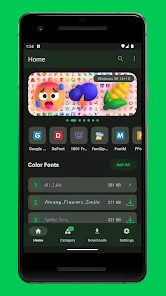
You will be greeted with a homepage showcasing various font styles and emoji packs. You can explore the collections or use the search bar to find a specific font. The app also lets you download fonts from popular sources like Google Fonts and DaFont.
Step 3: Download Your Chosen Font
Once you find a font you like, tap on it to see a preview. If you’re happy with your choice, tap the “Download” button. The font file will be saved to your device.
Step 4: Apply the Font
After the download is complete, tap the “Apply” button. zFont 3 will provide a method tailored to your specific Android device and OS version. For example, Samsung users on OneUI will be guided through a specific sequence of steps that involves installing a theme and backing up settings.
- Follow the on-screen instructions carefully. The app does an excellent job of providing a step-by-step guide for your specific device model. This process might involve installing an APK, changing your device’s region, or applying a theme.
Step 5: Reboot and Enjoy
In most cases, you will need to restart your device for the new font to take effect. Once your device reboots, you will see your new custom font applied across the entire system, from the settings menu to your messaging apps.
How to Customize Emojis with zFont 3
Express yourself better by swapping out your standard emojis for something more unique. The process is very similar to changing fonts.
- Open zFont 3 and navigate to the “Emoji” tab.
- Browse the available emoji packs, which often include styles from iOS, Windows, and other platforms.
- Download the emoji pack you want to use.
- Tap “Apply” and follow the instructions specific to your device.
- Restart your phone if prompted, and your new emojis will appear in your keyboard and apps.
This feature is perfect for users who prefer the look of iOS emojis or want a more consistent emoji style across different applications.
Tips for Advanced Customization
Once you master the basics, you can explore some of zFont 3’s more advanced features.
- Import Your Own Fonts: Have a specific
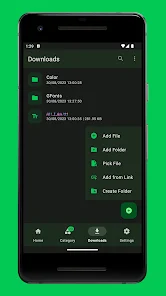
.ttfor.otffont file you want to use? zFont 3 lets you import local font files. Simply tap the “+” icon on the local tab and navigate to your downloaded font. - Mix and Match: For rooted users, zFont 3 allows for deeper customization. You can create systemless modules to combine elements, such as using one font for your system UI and another for specific apps.
- Use Fonts in Other Apps: Downloaded fonts aren’t just for your system. You can use them in design and video editing apps that support custom fonts, giving your creative projects a unique touch.
Troubleshooting Common Issues
While zFont 3 is designed to be user-friendly, you might encounter a few hiccups. Here are solutions to some common problems:
- Font Not Applying: This is often due to an incorrect application method or a new Android security update. Double-check that you are following the on-screen instructions for your device model precisely. Sometimes, clearing the app cache or reinstalling zFont 3 can resolve the issue.
- Device Region Change Not Working: Some brands like Oppo and OnePlus require changing the device region to Myanmar to apply fonts. If this option is not available in your settings, zFont 3 may not be able to change fonts on your device without root access.
- Emojis Appear as Squares (□): This usually means the emoji pack was not applied correctly or is not fully compatible with your OS version. Try reapplying the emoji pack or selecting a different one.
Why Use zFont 3 for Personalization?
Customizing your device with zFont 3 offers several benefits that go beyond just aesthetics.
- Endless Personalization: With a vast library of fonts and emojis, you have complete creative control over your device’s appearance.
- Improved Readability: Are you struggling with the default font? You can choose a font that is clearer and easier on the eyes, which can significantly improve your user experience.
- No Root Required (Mostly): Unlike many customization tools, zFont 3 works on a wide range of devices without needing root access, making it accessible to the average user.
- Completely Free: The core features of the app are free to use, offering incredible value for anyone looking to personalize their phone.
Transform Your Device Today
zFont 3 is more than just an app; it’s a gateway to making your Android device feel uniquely yours. Whether you want a sleek, modern font or a fun, expressive emoji set, this powerful tool has you covered. By following this guide, you can easily transform your phone’s interface and enhance your daily digital experience.
Ready to give your device a fresh new look? Download zFont 3 – Emoji & Font Changer from the Play Store and start exploring the endless possibilities of personalization.
Report

What's New
**14/05/2025 [3.8.6]**
- Fixed Shizuku not working
**10/05/2025 [3.8.5]**
- Improved Tecno & Infinix support
- Fixed Honor device issues
- LG support now works offline
- Switched from SAF to zFile as default handler
Download zFont 3 – Emoji & Font Changer
You are now ready to download zFont 3 - Emoji & Font Changer for free. Here are some notes:
- Please check our installation guide.
- To check the CPU and GPU of Android device, please use CPU-Z app